Camelot wheel
Pick any key on the Camelot wheel to see the keys that mix with it, or drop your songs to place them on the wheel by key and BPM. Free, nothing uploaded.
8AA minor
Open Key 1m · Am
Notes: A B C D E F G
Mixes in key
Mixes with care
Energy boost
Drop your songs here, or choose them: each is placed at its key, found on this device. MP3, WAV, FLAC, M4A, up to 30 min each.
How it works
- Pick a key on the wheel, or walk it with the arrow keys: the keys that mix with it light up.
- Read its musical key, Open Key code and scale notes, and each move from it, explained.
- Drop your songs onto the wheel: each lands at the key AudioRinse hears in it, with its BPM, on your device.
- Pick a key to see which of your songs mix next, nearest tempo first.
How the Camelot wheel works
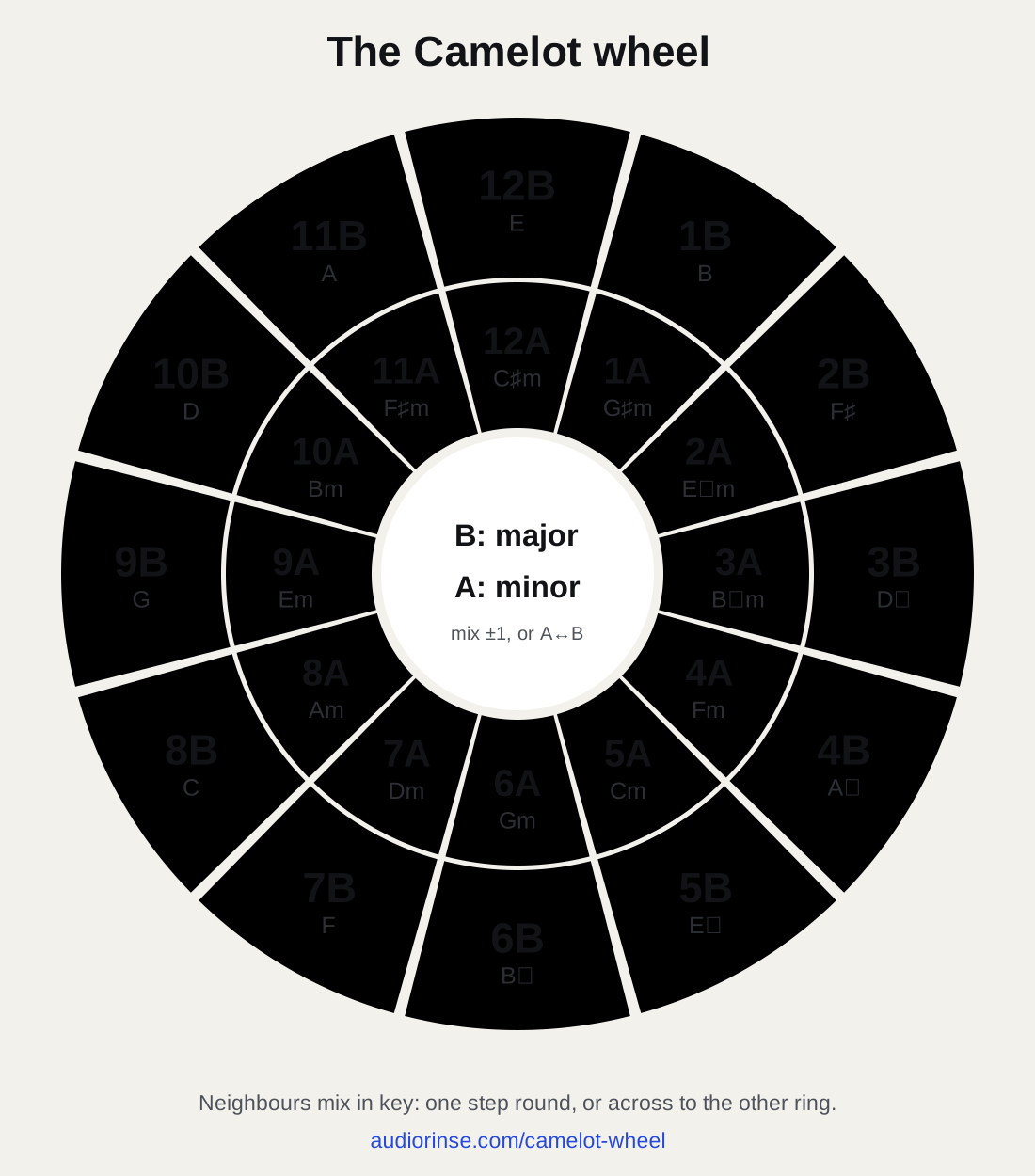
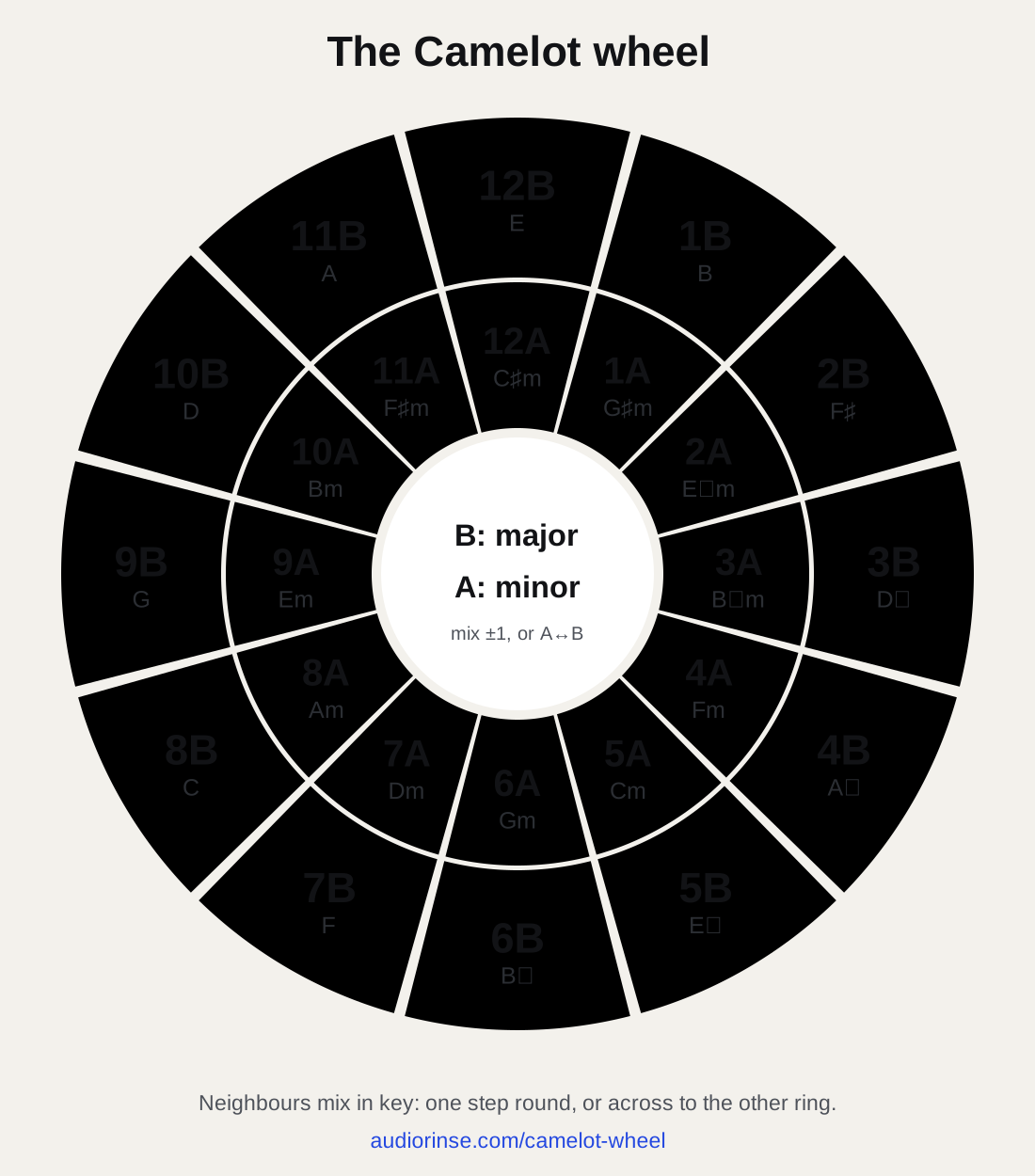
The wheel puts all 24 major and minor keys on a clock face. Each hour is a number from 1 to 12; the outer ring (B) holds the major keys and the inner ring (A) their relative minors, which use the same notes: 8B is C major, 8A is A minor.
Each step clockwise is a fifth up, so neighbours share six of their seven notes, and the key straight across on the other ring shares all seven. That's why songs one step apart, or across, blend without clashing. The wheel is the circle of fifths, renumbered so a DJ can count instead of thinking in sharps and flats.
The moves, from any key
- Same code: the same key. Always safe.
- One up or one down, same letter (8A to 9A or 7A): a fifth away, six notes shared. One up lifts the energy a little; one down settles it.
- Same number, other letter (8A to 8B): the relative major or minor. The notes stay; the mood changes.
- Diagonal (8A to 9B, or 8B to 7A): a step and a change of mode, six notes shared. It works, but listen first.
- Energy boost, two up (8A to 10A): a whole tone higher. A clear lift, best on a break or a drop rather than a long blend.
- Semitone up, seven up (8A to 3A): one semitone higher. The classic last-chorus key change: dramatic, for a short blend or a cut.
Every key and its Camelot code
| Camelot | Key | Also written | Open Key | Mixes with |
|---|---|---|---|---|
| 1A | G♯ minor | A♭ minor | 6m | 2A, 12A, 1B |
| 1B | B major | 6d | 2B, 12B, 1A | |
| 2A | E♭ minor | D♯ minor | 7m | 3A, 1A, 2B |
| 2B | F♯ major | G♭ major | 7d | 3B, 1B, 2A |
| 3A | B♭ minor | A♯ minor | 8m | 4A, 2A, 3B |
| 3B | D♭ major | C♯ major | 8d | 4B, 2B, 3A |
| 4A | F minor | 9m | 5A, 3A, 4B | |
| 4B | A♭ major | 9d | 5B, 3B, 4A | |
| 5A | C minor | 10m | 6A, 4A, 5B | |
| 5B | E♭ major | 10d | 6B, 4B, 5A | |
| 6A | G minor | 11m | 7A, 5A, 6B | |
| 6B | B♭ major | 11d | 7B, 5B, 6A | |
| 7A | D minor | 12m | 8A, 6A, 7B | |
| 7B | F major | 12d | 8B, 6B, 7A | |
| 8A | A minor | 1m | 9A, 7A, 8B | |
| 8B | C major | 1d | 9B, 7B, 8A | |
| 9A | E minor | 2m | 10A, 8A, 9B | |
| 9B | G major | 2d | 10B, 8B, 9A | |
| 10A | B minor | 3m | 11A, 9A, 10B | |
| 10B | D major | 3d | 11B, 9B, 10A | |
| 11A | F♯ minor | 4m | 12A, 10A, 11B | |
| 11B | A major | 4d | 12B, 10B, 11A | |
| 12A | C♯ minor | D♭ minor | 5m | 1A, 11A, 12B |
| 12B | E major | 5d | 1B, 11B, 12A |
Your songs on the wheel
Drop one song or a whole crate onto the wheel. Each is analysed on your device, the same way as on the key finder: its key becomes its place on the wheel, and its BPM comes with it. Pick a key and the panel lists your songs in it, then the ones a move away, nearest tempo first: the next record, found by ear and by number.
Detected keys are a strong first guess, not gospel. On standard test sets the key is exact on about 6 songs in 10, and exact or a wheel neighbour on about 3 in 4: check a mix by ear before you rely on it.
Key lock, and why tempo changes the key
Speed a record up and its pitch rises with it, unless your player's key lock (master tempo) is on. A semitone is about 6% of tempo, so a song at 8A pushed 6% faster plays at 3A, and one slowed 6% at 1A. Small nudges of 1 or 2% only bend the pitch a little; for bigger tempo changes, turn key lock on or count the shift on the wheel.
Questions
What is the Camelot wheel?
A chart DJs use to mix in key: the 24 major and minor keys on a clock face, numbered 1 to 12, with B for major and A for minor. Keys one step apart, or across from each other on the other ring, share all or nearly all of their notes, so songs in them blend without clashing.
What key is 8A?
A minor. 8B is C major, its relative major, with the same notes. The table above lists every code: 1A is G♯ minor (A♭ minor), 5B is E♭ major, 12A is C♯ minor.
What mixes with 8A?
8A itself, 7A (D minor), 9A (E minor) and 8B (C major) mix smoothly. 9B (G major) works with care. For an energy boost, go to 10A (B minor) or 3A (B♭ minor). Pick any key on the wheel to see its moves.
Who invented the Camelot wheel?
The Camelot system was devised by DJ Mark Davis, and Mixed In Key's software made it the standard way DJs label keys. AudioRinse isn't affiliated with Mixed In Key; this wheel and the key detection are our own.
What's the difference between Camelot and Open Key?
The same wheel with other labels. Open Key, used by Traktor, numbers from C major (1d) and A minor (1m), with d for major and m for minor; Camelot calls those 8B and 8A. Switch the labels on the wheel, or read both in the table.
Is the Camelot wheel the circle of fifths?
Yes, renumbered. Each step clockwise is a fifth up, and each major key is paired with its relative minor. The numbers let you mix in key by counting, without reading sharps and flats.
How do I find the key of my songs?
Drop them onto the wheel above, or use the key finder or the BPM and key finder for a CSV of a whole folder. The analysis runs in your browser; nothing is uploaded.
Is it free?
Yes, with no limit, no account and no ads. The wheel, the chart and the key finding all run in your browser.
Other tools
- Find the BPM of a songThe tempo of any song, with its key and Camelot code.
- Find the key of a songThe key of any song, with its Camelot code and tuning.
- BPM and key finderTempo, key and Camelot for a whole folder of songs, as a CSV.
- Tap tempoTap along on each beat and read the BPM.
- Remove background noise from audioFans, traffic, hiss and room noise out of a voice recording.
- Remove background noise from videoClean a video's soundtrack. The picture is kept untouched.
- Voice isolatorKeep only the voice; everything else goes.
- Audio enhancerNoise removal + voice EQ + loudness, in one step.
- Voice enhancerClearer, fuller, evenly loud voice.
- Remove reverb from audioLess room, more voice: for recordings made in echoey rooms.
- Remove echo from audioFix the hollow, echoey sound of a big or empty room.
- Remove buzz and hum from audioElectrical buzz and hum out; the voice or music around it untouched.
- Remove silence from audioDead air out: every long pause cut to a set length.
- De-esserHarsh S sounds softened; the voice keeps its brightness.
- Fix clipped audioFlattened, crackly peaks from recording too loud, rebuilt.
- Mouth click removerLip smacks and tongue clicks out of a voice-over.
- Normalize audioPodcast, YouTube or broadcast loudness, true-peak safe.
- Remove vocals from a songThe vocals out of a song: a clean instrumental, and the acapella too.
- Split a song into stemsVocals, drums, bass and the rest, each on its own track.
- Remove music from a videoBackground music out of a video; the voices stay.
- Make a karaoke version of a songAny song as a karaoke track: the vocals out, the band left.
- Extract the vocals from a songThe vocals alone from any song: an acapella for remixes and covers.
- Make an instrumental of a songThe instrumental version of any song, the vocals taken out.
- Remove the drums from a songThe drums out of a song, for drummers to play along.
- Audio to sheet musicA piano recording written out as a two-hand score.
- MP3 to sheet musicAn MP3 of piano music, written out as a printable score.
- Piano transcriptionPiano playing written out, both hands, in seconds.
- Video to MP3The sound of any video as an MP3. Free, no limit.
- MP4 to MP3Any MP4's sound as an MP3, in seconds.
- Video to audioAny video to MP3, M4A or WAV. Free, no limit.
- MOV to MP3iPhone and QuickTime videos to MP3.
- MP4 to WAVUncompressed WAV from any MP4, for editing.
- WebM to MP3WebM video or audio to MP3.
- MKV to MP3OBS recordings and MKV films to MP3.
- Extract audio from videoA video's sound track as a file, in its original quality.
- M4A to MP3Voice memos and iTunes songs as MP3.
- WAV to MP3WAV to MP3 at a fraction of the size.
- MP3 to WAVMP3 to uncompressed WAV, for editing.
- M4A to WAVVoice memos and M4A to uncompressed WAV.
- OGG to MP3Ogg Vorbis, Opus and voice messages to MP3.
- FLAC to MP3Lossless FLAC to MP3, tags and cover kept.
- Transcribe audio to textAny recording to text, transcribed on your computer.
- Convert audio to textSpeech in any audio file, converted to text on your device.
- Convert MP3 to textAn MP3's speech as text, with timestamps.
- Transcribe a video to textWhat's said in a video, as a timestamped transcript.
- Convert video to textSpeech in any video, converted to text on your device.
- Add subtitles to a videoAuto subtitles, edited in place, burned in or as SRT.
- Auto captions for your videoCaptions for reels and videos, styled and burned in.
- Generate subtitles automaticallyTimed SRT and VTT subtitles from any video.
- Interview transcriptionSpeaker-labelled transcripts, made on your computer.
- Transcription for qualitative researchInterviews and focus groups, ready for NVivo and MAXQDA.